
Luks Casino No Deposit Trial Bonus: 500 TRY and Confirmation Steps
The trial bonus (deneme bonusu) is worth 500 TRY. No deposit is required to receive it. Instead, you are asked to confirm your phone number and email address. Once both confirmations are done, the bonus is credited to your account.
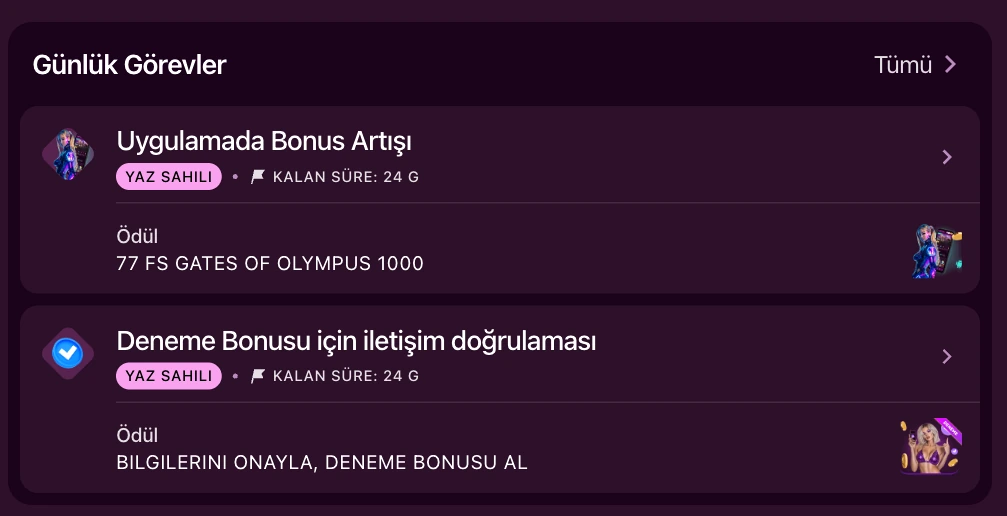
Trial Bonus Conditions
The trial bonus works differently from other welcome offers. There is no deposit condition, only two confirmations. The table below summarises the conditions.
| Condition | Detail |
|---|---|
| Bonus amount | 500 TRY |
| Deposit requirement | None |
| Phone confirmation | Required |
| Email confirmation | Required |
| Where the bonus appears | "Bonuses" section |
| Wagering and validity | Shown separately in your account panel |
The trial bonus is evaluated separately from the Casino Paketi and Spor Paketi welcome offers. You can still claim it even if you skip a welcome package on the registration form. The list of games that count toward wagering is shown in your account panel.
Steps to Claim the Trial Bonus
Claiming the bonus takes a few steps. Complete them in order:
- Open a new account or log in with your existing one at the login page. The registration form has "Phone" and "Email" tabs. Your password must be at least 6 characters. A visibility icon lets you check what you typed.
- If you have a promo code, enter it in the relevant field. This field is optional and can be left blank.
- Confirm your phone number.
- Confirm your email address.
- Once both confirmations are complete, the 500 TRY trial bonus is credited to your account.
Why Are Phone and Email Confirmation Required?
These confirmations are used not only for the trial bonus but also for general account security. Before withdrawing funds, three steps are required.
| Step | Purpose |
|---|---|
| Confirm your phone number | Account security, mandatory before withdrawal |
| Confirm your email address | Account security, mandatory before withdrawal |
| Make your first real-money deposit | Mandatory third step before withdrawal |
The two confirmations you complete during the trial bonus process cover the first two of these three steps. The withdrawal screen shows a checklist. Completed steps are marked with a checkmark. Steps that are not yet done are advanced with a "continue verification" option. For the third step, check the withdrawal conditions. Your account is protected with 256-bit SSL encryption, including during confirmation steps. Your IP address and browser data are logged automatically for security purposes.
Registration and Login Options
You need an account before you can claim the trial bonus. Registration and login are available through several methods, shown in the table below.
| Method | Detail |
|---|---|
| Register by phone | Country code (default +90), phone number and password |
| Register by email | Email address and password |
| Log in by phone | Your registered phone number and password |
| Log in by email | Your registered email address and password |
| Log in by Account ID | Your account number and password |
If you forget your password, use the "Forgot your password?" link on the login screen. Only one account can be opened per user on our platform. This rule also applies to the trial bonus, which is evaluated once per account.
Account Verification and Next Steps
During registration, your name, surname and identity document details are collected as part of the general verification process. The 18+ age requirement is confirmed through the checkbox on the registration form. After phone confirmation, email confirmation and your first real-money deposit, document verification may also be requested before withdrawal. This step runs through an independent system called KYCAID. One of the following document types is accepted:
- ID card
- Passport
- Driver's license
You can upload your document from a computer or continue the process from your phone. This verification is a separate step that follows phone and email confirmation. When withdrawing, funds are returned using the same method you used to deposit. Balance transfers between different users are not allowed, and transfers from third parties are not accepted either. This rule is part of account security.
Trial Bonus and Daily Tasks
Phone and email confirmation also show up in the daily tasks panel. The "Earn Rewards" section lists daily tasks, including one that rewards contact verification. This task is part of the trial bonus process. During seasonal campaigns, the same task may be offered with different rewards. The current list of tasks is shown on the daily tasks screen in your account panel.
Connection to Other Bonuses
The trial bonus is only one of the offers listed in the "Bonuses" section. The table below summarises the other main offers in that section.
| Offer | Detail |
|---|---|
| Casino Paketi | Welcome bonus spread across multiple deposits |
| Spor Paketi | Separate welcome bonus for sports betting |
| Daily Champion | Daily leaderboard competition |
| Lucky Lotto 55 | Time-limited internal draw |
| VIP deposit cashback | Tiered cashback for VIP users |
Full terms for these offers are shown on their own pages and in your account panel. Promo codes are shared through our Telegram channel. Visit our bonuses page for current offers, or return to the homepage for the full platform overview.
Frequently Asked Questions
Do I need to deposit for the trial bonus?
No. The trial bonus does not require a deposit. It depends on confirming your phone number and email address. Once both confirmations are done, the 500 TRY bonus is credited to your account.
How many times can I claim the trial bonus per account?
Only one account can be opened per user on our platform, so the trial bonus is also evaluated per account.
Can I withdraw what I win with the trial bonus?
Before withdrawing, your account is asked to complete phone confirmation, email confirmation and a first real-money deposit. The confirmations you complete during the trial bonus process cover the first two of these steps.
Do I need to enter a promo code for the trial bonus?
No. The trial bonus works independently of the promo code field. The promo code field on the registration form is optional and can be left blank.